
 September 30, 2026
 Canadian Hosting, Web Hosting Canada
Most guides to choosing a web host are feature comparisons: storage, bandwidth, number of email accounts. Those matter, but they are the easy part. Plan pages are designed to make features comparable. What a plan page is not designed to tell you is whether the company is what it says it is, and what its guarantees are actually worth. It also won’t tell you how the contract behaves at renewal, or how hard it will be to leave.
For Canadian companies, the decision carries extra weight. Where the data sits affects privacy disclosures and, for businesses serving Québec, legal assessments. Claims about “Canadian” hosting and “PIPEDA compliance” are common and vary widely in what they mean. A provider that looks local may run its infrastructure through companies in other jurisdictions.
This guide sets out what to check before you choose a Canadian web host, in the order that saves the most time:
It closes with a weighted scorecard you can use to compare two or three providers side by side.

Six-step graphic for choosing a Canadian web host: decide needs, verify the company, read the claims, read the contract, test in the trial, plan your exit
Comparing providers before you know what you need produces the wrong shortlist. Start with the site, not the market.
| If your site is… | You most likely need | What matters most in the comparison |
| A brochure site with a contact form | Shared hosting | Renewal price, email, backups, support |
| A WordPress site with regular posts and several plugins | Upper-tier shared or managed WordPress | PHP versions, staging, caching, backups |
| An online store taking card payments | Upper-tier shared, managed WordPress or entry VPS | Performance at peak, PCI-friendly checkout, backups, support response |
| Several sites for clients or brands | Reseller hosting or VPS | Account isolation, control panel, per-site backups |
| A custom application or high-traffic store | VPS or dedicated server | Guaranteed resources, management options, working price |
Write down three things before you look at a single plan page:
That last question decides which of the checks below deserves the most weight.
“Canadian web hosting” can describe very different arrangements. Some Canadian companies own and operate their infrastructure. Others resell space in data centres run by larger providers, which is common and not a problem in itself. And some companies sell to Canadians from elsewhere, using Canadian-sounding branding. None of these is inherently wrong. What matters is that the description matches reality, because it determines the answers you will give your own customers about where their data is.
Five checks take about fifteen minutes in total:
| Check | How to do it | What a reassuring result looks like |
| Corporate registration | Search the company’s legal name in the federal corporations registry or the provincial business registry for the province it names | An active registration matching the legal name in the provider’s terms of service |
| Physical address | Compare the address in the terms of service and privacy policy with the address on the contact page | The same address everywhere, and a real office rather than only a mail drop |
| Data centre operator | Ask which company operates each facility your data will be stored in, and in which city | Named operators and cities, consistent across the provider’s pages |
| Network owner | After signing up for a trial, look up your site’s IP address in a public WHOIS or IP-lookup tool | The network is registered to the provider or its named data centre operator, in the country stated |
| Consistency | Read the plan pages, data-centre page, backup descriptions and FAQ side by side | Locations, prices and inclusions match across every page |
The consistency check sounds trivial and is often the most revealing. If one page says backups are stored in one city and another page names a different city, ask which is true before you rely on either. The same goes for a price that differs between a plan table and the FAQ below it. You will be the one repeating the answer in your privacy policy.
Hosting marketing leans on a small set of phrases. Each has a legitimate meaning and an inflated one. Canada’s Competition Act prohibits false or misleading representations. Businesses can also ask for the substantiation behind any performance claim a provider makes.
| Claim | What it can legitimately mean | What to ask |
| “PIPEDA-compliant hosting” | The provider has privacy policies, safeguards and breach processes that support your obligations | PIPEDA places accountability on the organization that collects the information. There is no official PIPEDA certification for hosting providers. Ask which specific safeguards and commitments the claim refers to, in writing. |
| “Canadian data centres” | Some or all infrastructure is in Canada | Which cities, for which services (website, databases, backups, email), and operated by whom? |
| “Unlimited” storage or bandwidth | No fixed cap, subject to fair-use or resource limits | What are the CPU, memory, file-count and fair-use limits, and what happens when you reach them? |
| “99.9% uptime guarantee” | A service-level target with a remedy if missed | What credit is paid, how is downtime measured, what is excluded, and how do you claim? |
| “Free SSL” | A domain-validated certificate issued at no charge | Does it renew automatically for every hostname, and does it cover e-commerce checkout? |
| “Free migration” | The provider moves your site at no charge | On which billing terms, how many sites, and does it include email and databases? |
| “Best,” “fastest,” “most secure” | A superiority claim | What testing supports it? Unsubstantiated superlatives tell you nothing about your own site. |
An uptime percentage sounds precise until you convert it into time. Here is how much downtime each common guarantee allows before it is breached:
| Guarantee | Allowed downtime per month | Allowed downtime per year |
| 99.0% | About 7.3 hours | About 3.7 days |
| 99.5% | About 3.7 hours | About 1.8 days |
| 99.9% | About 44 minutes | About 8.8 hours |
| 99.95% | About 22 minutes | About 4.4 hours |
| 99.99% | About 4 minutes | About 53 minutes |
Two points matter more than the percentage itself. First, the remedy for a breached guarantee is usually a credit against future hosting fees, often capped at a portion of the monthly fee. That rarely compensates for a lost sale. Second, most service agreements exclude scheduled maintenance and problems caused by the customer’s own code. They may also require you to file a claim within a short window. Read the service-level agreement, not the badge on the plan page.
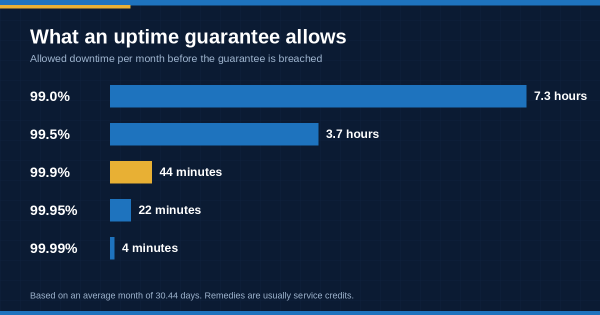
Chart converting uptime guarantees from 99.0% to 99.99% into allowed minutes of downtime per month
The terms of service, acceptable use policy, privacy policy and any service-level agreement define what you are actually buying. They are long. The sections below are the ones worth reading word by word.
| Contract section | What to look for |
| Pricing and renewal | Whether introductory pricing applies to the first term only, what the regular renewal rate is for your chosen term, and whether renewal is automatic |
| Money-back guarantee | How long it lasts, and what it excludes. Domain registrations and add-on services are often non-refundable. |
| Cancellation | Notice period, whether prepaid terms are refundable pro rata, and how cancellation is requested |
| Resource and fair-use limits | How “unlimited” is bounded, and whether the provider can suspend a site for resource use without notice |
| Backups | Frequency, retention, location, and whether restores are free or charged |
| Data after cancellation | How long data and backups are kept, and whether deletion is confirmed |
| Incident notification | Whether the provider commits to telling you about security incidents affecting your data, and how quickly |
| Liability | The cap on the provider’s liability, usually a multiple of fees paid |
| Governing law | Which province’s or country’s law governs the agreement |
For a deeper list focused on where data lives and who can reach it, use our [data residency questions] guide. For the numbers behind renewal and add-on pricing, see [how hosting costs change as a Canadian website grows].
A money-back period is not only a safety net. It is a test window, and most buyers waste it. Use the first two weeks to check the things no plan page can show you.
If a provider does not offer a trial or money-back period, ask for a demo account or a month-to-month plan for the first term. The higher monthly price is a small cost for the information it buys.
The best time to plan leaving a host is before you join it. Three decisions at sign-up make every future move cheaper:
Ask one more question at sign-up: if you leave, how long will the provider keep your data and backups, and will it confirm deletion? That answer belongs in your own privacy records.
Some findings from the steps above are minor and can be clarified with a question. Others should end the conversation, or at least move a provider to the bottom of the list.
None of these proves a provider is unreliable. Each is a sign that you will be doing extra work later to get answers that should have been available at the start.
Many Canadian companies are not choosing a first host but replacing one. The steps are the same, with three additions.
First, time the move to your current renewal date. Leaving mid-term often forfeits prepaid months, while moving at renewal avoids paying twice. Second, list everything the current host provides before you cancel: email accounts, DNS records, SSL certificates, scheduled tasks, backups and any services configured years ago that nobody remembers. The most common migration problem is not the website itself but a forgotten email forwarder or DNS record. Third, lower the time-to-live on your DNS records a few days before the move. Changes then take effect quickly on switch-over day, and can be reversed quickly if something goes wrong.
Keep the old account active for a week or two after the switch, until you have confirmed that the website, email and every form work on the new host. Then request cancellation in writing and ask the old provider to confirm when your data and backups will be deleted.
Once you have a shortlist of two or three providers, score each one. Weight the categories to match the failure you most want to avoid from Step 1. The default weights below suit a typical small Canadian business with a website and business email.
| Category | Default weight | What earns a high score |
| Data location and jurisdiction | 15% | Named Canadian cities for website, databases, backups and email, consistent across pages and confirmed in writing |
| Company verification | 10% | Registration, address and network ownership all check out |
| Working price at renewal | 15% | Renewal rate and required add-ons are published and within budget |
| Support quality (tested) | 15% | Fast, specific, human answers to your test ticket and after-hours contact |
| Backups and restore (tested) | 15% | Off-server backups, known retention, and a free, fast restore in your test |
| Performance (tested) | 10% | Competitive time to first byte from a Canadian location on your own site copy |
| Contract terms | 10% | Clear renewal, cancellation, incident notification and data deletion terms |
| Exit and portability | 10% | Standard control panel, full-account export, domain held by you |
Score each category from 1 to 5, multiply by its weight and add the results. The totals show you which provider fits best on paper. The differences between categories show you where each one is weakest. For an online store, move weight from data location to performance and support. For a Québec-facing business or one handling sensitive information, move weight toward data location and contract terms.
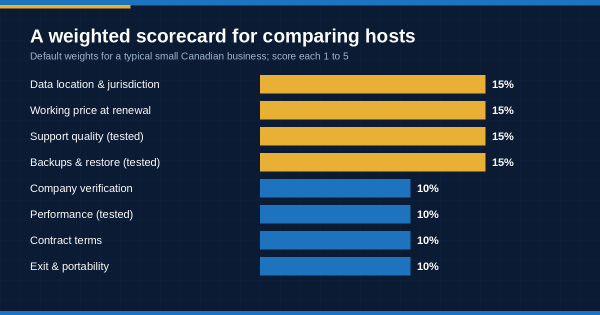
Weighted scorecard graphic with eight categories for comparing Canadian web hosting providers
For many Canadian companies, Canadian hosting is a deliberate choice rather than a default. It keeps the website, databases and backups under Canadian jurisdiction. It simplifies the privacy disclosures a business makes to its customers, and it shortens the network path to Canadian visitors. For Québec-facing businesses, keeping data in Canada simplifies, but does not remove, the assessment required before personal information leaves the province.
Canada hosting delivers those benefits only when the answers hold for every component. Ask a Canadian web hosting company for the location of each service in writing, not only the website server. When comparing Canada web hosting options, the scorecard above keeps location in proportion. It is a heavily weighted category, but one of eight. Well-run web hosting companies are comfortable being compared this way, because the checks reward clear answers rather than marketing.
Most of these checks apply equally to any website hosting provider, Canadian or not. What makes Canadian web hosting services worth choosing is the combination: Canadian jurisdiction, and a provider that passes the rest of the checklist too.
How do I choose a Canadian web host?
Start by defining your site’s needs and your budget at renewal price. Then verify the company’s registration, address and data centre locations, and read its claims and contract critically. Test support, speed and backup restores during the money-back period. Finally, compare your shortlist with a weighted scorecard that reflects the failure you most want to avoid.
How can I tell if a web host is actually Canadian?
Check the company’s legal name in the federal or provincial corporate registry, compare the address across its terms and contact pages, and ask which company operates each data centre. After signing up for a trial, look up your site’s IP address in a public WHOIS tool to see who owns the network and where it is registered. Consistent answers across all of these are a good sign.
Is there such a thing as PIPEDA-compliant hosting?
Not as an official certification. PIPEDA places accountability for personal information on the organization that collects it, not on its hosting provider. A provider can support your compliance with appropriate safeguards, clear data locations and incident notification commitments. Ask for those specifics in writing rather than relying on the label.
What does a 99.9% uptime guarantee mean?
It allows about 44 minutes of downtime a month, or about 8.8 hours a year, before the guarantee is breached. The remedy is usually a credit against future fees rather than compensation for lost business. Most agreements exclude scheduled maintenance, and many require a claim within a set period, so read the service-level agreement itself.
What should I check in a web hosting contract?
Read the renewal pricing and automatic-renewal terms, and the money-back guarantee’s exclusions. Check the cancellation and refund terms, and the resource or fair-use limits. Look at backup frequency, retention and restore charges, what happens to your data after cancellation, incident notification, the liability cap and the governing law.
Should my domain be registered with my web host?
It is safer to register the domain in your business’s legal name, ideally with a registrar separate from your host. That way the domain stays under your control if you change providers or if a hosting account is suspended. If the host does register it, confirm that you are listed as the registrant.
How should I use a hosting money-back guarantee?
Treat it as a test period. Open a technical support ticket and contact support after hours. Measure your site’s speed from a Canadian location, restore a backup, and check the control panel. Confirm the network location of your trial site, and ask at least one data-location question in writing. Those results tell you more than any feature list.
Choosing a web host is less about finding the provider with the longest feature list than about finding one whose answers hold up. The checks in this guide are designed to surface those answers before you sign: who the company is, what its claims mean, what the contract says, and how it behaves when you test it. None of them takes long, and together they replace marketing with evidence.
For Canadian companies, Canadian web hosting can settle the jurisdiction question. The rest of the decision still depends on verification, testing and contract terms. A provider that passes all six steps and scores well on your weighted scorecard is one you can build on with confidence.
If you would like to put these checks to 4GoodHosting, the team can answer the data-location, backup and contract questions in this guide for the plan you are considering. Talk to the 4GoodHosting team .
 November 3, 2026Canadian Hosting
 November 2, 2026Business, Ecommerce
 November 2, 2026Hosting, Managed WordPress Hosting Canada, WordPress
 November 2, 2026Business, SEO
 November 2, 2026Hosting, Security & Compliance, WordPress
 November 2, 2026Business, WordPress