
 April 21, 2026
 Canadian Hosting, Hosting, Managed WordPress Hosting Canada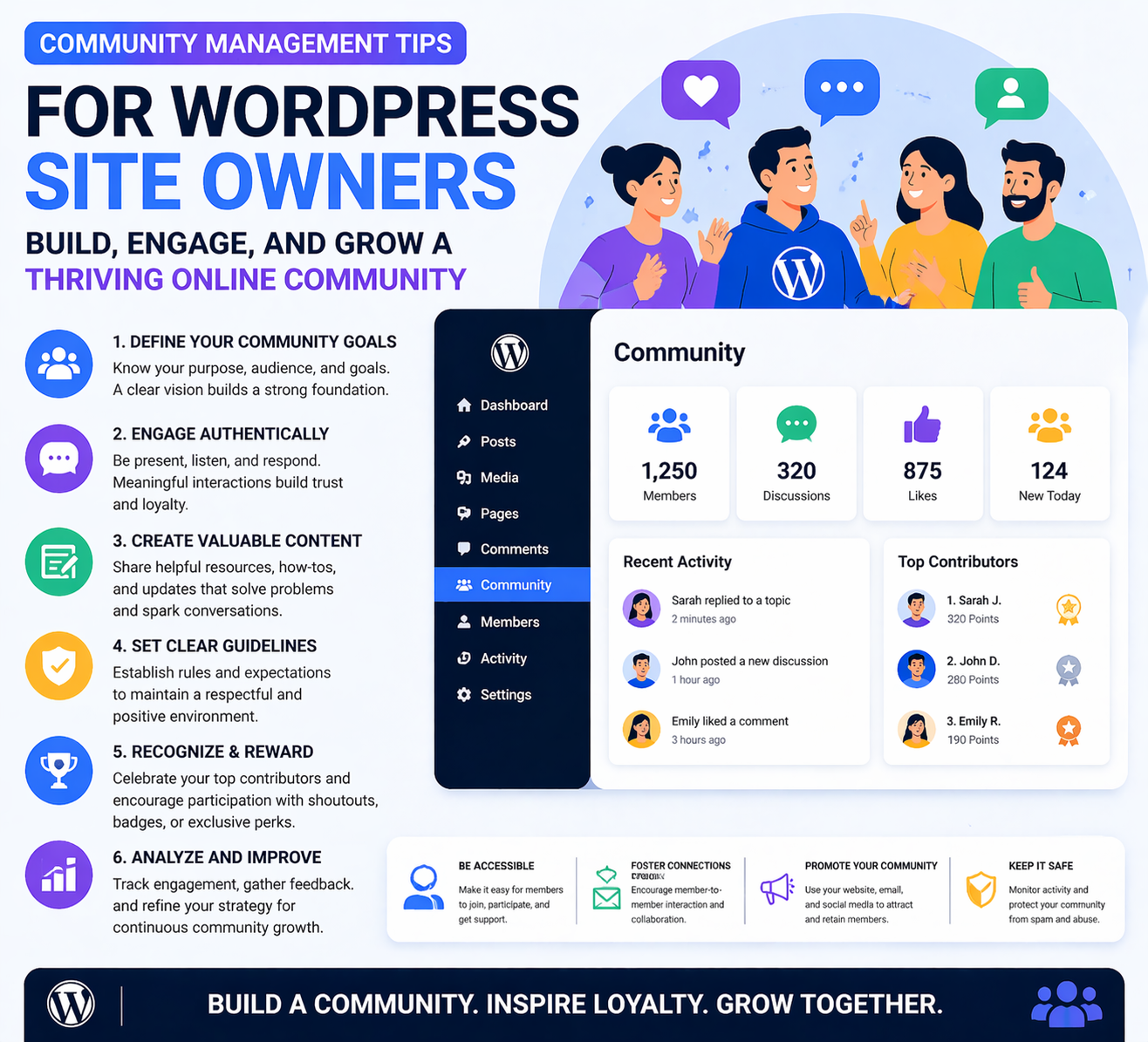
Building a WordPress website is one thing. Building a thriving community around it is another — and in many ways, far more valuable. A loyal, engaged community turns casual visitors into repeat readers, passive browsers into active contributors, and one-time customers into long-term advocates. For bloggers, course creators, non-profits, local businesses, and digital brands alike, community is often the differentiator between a website that plateaus and one that continues to grow month after month.
At 4GoodHosting, we’ve supported thousands of WordPress-powered websites through our managed WordPress Hosting platform, with infrastructure hosted in our Canadian Data Centers to deliver the speed and reliability your community expects. We’ve seen firsthand how the sites that invest in community management consistently outperform those that treat their website as a one-way broadcast channel. The engagement, loyalty, and word-of-mouth growth that a strong community generates is something no advertising budget can easily replicate.
In this comprehensive guide, we’ll walk through the most effective community management strategies for WordPress site owners — from setting up the right tools and establishing clear community guidelines, to engagement techniques, conflict resolution, recognizing your most valuable contributors, and scaling your community as it grows.
A well-managed community gives people a reason to come back to your site beyond reading a single piece of content. When members know they’ll find fresh discussions, responses to their comments, and interactions with like-minded people, your site becomes a destination rather than a one-time visit. Repeat traffic is one of the most valuable metrics for any website — it signals genuine interest and keeps your engagement metrics strong.
If you run a membership site, online course, or subscription community on WordPress, the community itself is often the primary retention driver — more important than the content alone. Members who are actively engaged in a community, who have friends and connections within it, and who feel a sense of belonging are far less likely to cancel. Community turns a product into an experience.
An active community is a continuous source of user-generated content, questions, discussions, and feedback. Comments, forum threads, and community posts create content that improves your site’s SEO, reveals what your audience cares about most, and surfaces blog post ideas you might never have thought of independently.
A website with a thriving, positive community signals authority and trustworthiness. Visitors who arrive and see hundreds of thoughtful comments, active discussions, and engaged members immediately perceive your site as a credible, established resource — not just another anonymous website.
The first decision is what type of community you’re building, because each format has different technical requirements:
The WordPress plugin ecosystem offers robust solutions for every community format:
Community features generate significantly more database queries and server load than a standard blog. This makes the performance of your hosting infrastructure critical. A slow site kills community engagement: members leave if pages take too long to load, and the frustration of a laggy forum or sluggish activity feed drives people away quickly.
This is one of the key reasons 4GoodHosting’s managed WordPress Hosting is an ideal foundation for community-driven WordPress sites. Our servers are optimized specifically for WordPress’s database and PHP performance characteristics, ensuring your community features load fast even under heavy traffic. And with our infrastructure housed in Canadian Data Centers, your Canadian community members benefit from the lowest possible latency — keeping them coming back.
Pro Tip: Before launching community features, test your site’s performance under simulated load. Quality managed WordPress Hosting from 4GoodHosting scales to handle your community as it grows.
Every successful online community has clear, well-communicated guidelines that define what’s expected of members. Without guidelines, communities devolve into chaos — spam, off-topic content, personal attacks, and disruptive behavior drive away the thoughtful, constructive members you want to retain.
Create a dedicated guidelines page on your WordPress site and link to it prominently — in your site navigation, in the community header or sidebar, in your welcome email to new members, and in automated messages to new forum participants. Keep the language plain and direct. Long, legalistic documents don’t get read; clear, scannable guidelines do.
Your guidelines set the standard, but your behavior as the community manager enforces it. The tone you model in your own posts, comments, and responses sets the cultural norm for the entire community. Consistency between stated guidelines and actual behavior — especially from leadership — is what makes guidelines credible.
A community that isn’t actively managed quickly goes quiet. Engagement is the lifeblood of any online community — and generating it consistently requires deliberate strategy, not just hope that members will talk to each other spontaneously.
Just as your blog needs a content calendar, your community needs one too. Plan a regular cadence of engagement-driving posts and activities:
The first interaction a new member has in your community sets the tone for their entire relationship with it. Make it a rule to respond to every new member introduction or first post. A warm, personal welcome from the community manager makes new members feel seen and valued, dramatically increasing the likelihood they’ll become active, long-term participants.
Pro Tip: Create a “New Member Introductions” thread or section where all new members are encouraged to introduce themselves. This gives new members an easy, low-pressure first post and helps existing members discover and welcome newcomers.
The quality of your community discussions is directly proportional to the quality of the questions you seed them with. Compare “What do you think about WordPress?” with “What’s one WordPress plugin you couldn’t live without and why?” — the second question is specific, personal, and easy to answer, which is exactly what drives high response rates.
Nothing kills community trust faster than unanswered questions. When community members ask questions — in forums, in comments, in discussions — make sure every question gets a response, even if the response is directing them to a resource. A community where questions go unanswered quickly feels abandoned.
Even the most well-managed communities encounter conflict. How you handle it determines whether conflict becomes a learning moment that strengthens the community, or a damaging episode that drives good members away.
When conflict arises — a heated argument, an aggressive comment, a spam attack — respond quickly and calmly. Delayed responses allow conflict to escalate; public responses that are reactive or emotional make it worse. Acknowledge the situation, state clearly what behavior is or isn’t acceptable, and take any necessary moderation action without drama.
For conflicts that require more than a brief moderation note, move the conversation out of the public community space and into a private message or email. Public call-outs — even of members who have genuinely violated guidelines — create spectacle that makes other members uncomfortable. Handle serious issues privately, firmly, and professionally.
Inconsistent enforcement is one of the fastest ways to lose community trust. If you enforce a rule against self-promotion for some members but not others, you’ll create resentment and accusations of favoritism. Guidelines must be applied consistently to everyone, every time — regardless of how long someone has been a member or how much they’ve contributed in the past.
Most community problems can be resolved with a warning or a brief suspension. But some members are genuinely disruptive — serial rule-violators, abusive members who won’t change, or spammers. Removing these members promptly and permanently protects the experience of the majority. A community manager who protects their community from persistent bad actors earns enormous trust and respect from the members who remain.
In every online community, a small percentage of members generate the majority of the value — answering questions, welcoming newcomers, starting great discussions, contributing resources. Recognizing them is both a reward for their contribution and a signal to the wider community about what great membership looks like.
Don’t underestimate the power of simple, genuine recognition. A personal thank-you in a comment, a shout-out in your newsletter, or a direct message expressing appreciation for a member’s contribution takes two minutes and creates lasting loyalty. People need to feel that their time and effort are noticed and valued.
The community management strategies that work when you have 50 members won’t all scale to 500 or 5,000 members. Growing communities require evolving systems, delegated responsibility, and stronger infrastructure.
As your community grows, you’ll need help moderating it. Recruit trusted, long-standing community members as volunteer moderators. Give them clear guidelines, defined responsibilities, and the tools they need to handle routine moderation tasks. A team of moderators who genuinely care about the community’s culture is more effective — and more scalable — than a single community manager trying to do everything alone.
Use automation to handle repetitive moderation tasks: spam filtering, welcome messages for new members, automated notifications for flagged content, and scheduled recurring discussion threads. WordPress plugins and third-party tools offer extensive automation capabilities. Automation frees your time for the high-value tasks that genuinely require a human touch — personal responses, conflict resolution, and community strategy.
A growing community puts increasing demands on your WordPress hosting infrastructure. More members mean more concurrent users, more database queries, more plugin activity, and more traffic. It’s essential that your hosting can scale to meet this demand without degrading performance or causing downtime.
This is where 4GoodHosting’s managed WordPress Hosting provides genuine peace of mind. Our infrastructure in Canadian Data Centers is built to handle the scaling demands of growing WordPress communities. Our managed WordPress Hosting platform includes performance optimization, caching, and scalable resources that grow with your community — so you can focus on community management, not server management.
| Community Stage | Key Priority | 4GoodHosting Support |
| 0–100 members | Establish guidelines & first engagement rituals | Reliable managed WordPress Hosting foundation |
| 100–500 members | Content calendar & consistent moderation | Performance optimization for growing traffic |
| 500–2,000 members | Moderation team & automation setup | Scalable hosting in Canadian Data Centers |
| 2,000+ members | Culture preservation & advanced gamification | Enterprise-grade managed WordPress infrastructure |
A thriving online community is one of the most powerful assets a WordPress site can have. It drives loyalty, generates content, builds trust, and creates the kind of organic word-of-mouth growth that no paid campaign can replicate. But building and managing that community takes time, strategy, and the right technical foundation underneath it.
At 4GoodHosting, we’re committed to giving your WordPress community the performance and reliability it needs to flourish. Our managed WordPress Hosting is optimized for WordPress at every level — from database performance to plugin compatibility to uptime — so your community features load fast, stay available, and scale as your membership grows.
With servers in our Canadian Data Centers, your community members across Canada enjoy fast, low-latency performance and the assurance that their data is stored on Canadian soil, under Canadian privacy laws. For Canadian community builders, 4GoodHosting is the natural hosting choice.
Every 4GoodHosting managed WordPress Hosting plan includes:
Whether you’re launching a brand-new WordPress community or scaling an established one to thousands of members, 4GoodHosting provides the managed WordPress Hosting infrastructure that keeps your community fast, secure, and always available — all from our Canadian Data Centers.
Get started with 4GoodHosting today — Canada’s trusted managed WordPress Hosting provider, powered by Canadian Data Centers.
 September 29, 2026Canadian Hosting
 September 29, 2026Canadian Hosting
 September 16, 2026VPS Hosting canada
 September 16, 2026Canadian Hosting, Hosting, Web Hosting Canada
 September 16, 2026Canadian Hosting, Web Hosting Canada, Web Hosting Toronto
 September 16, 2026VPS Hosting canada, Web Hosting Canada