
 April 20, 2026
 Canadian Hosting, Hosting, Web Hosting Canada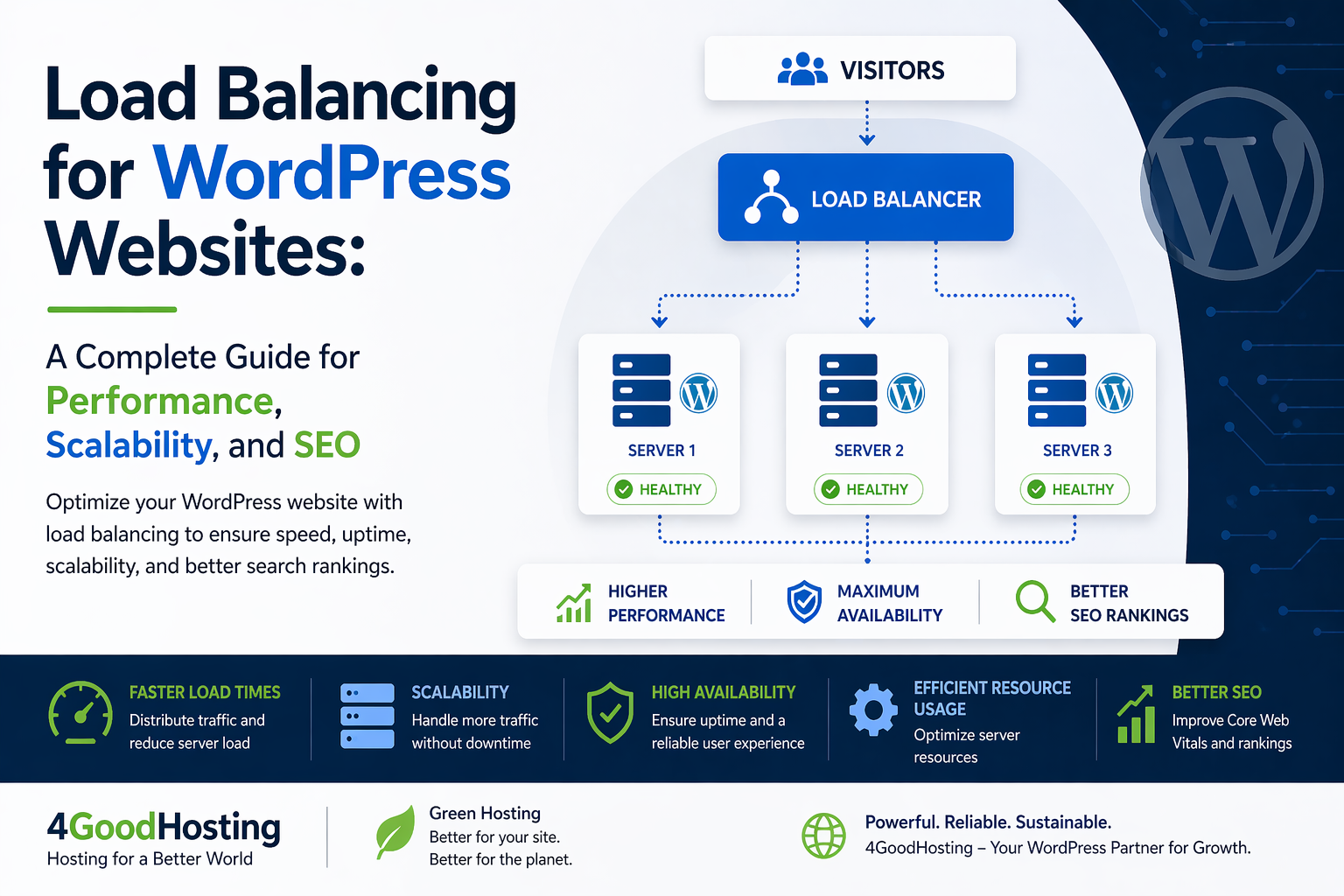
Modern websites are no longer static digital brochures—they are dynamic platforms that must handle traffic spikes, deliver fast experiences across regions, and maintain uptime under pressure. For WordPress websites, this challenge becomes even more complex due to plugins, database queries, and dynamic content rendering.
As businesses in Canada and Europe increasingly rely on WordPress for eCommerce, SaaS, and content-driven platforms, performance infrastructure has become a competitive advantage. One of the most powerful yet often misunderstood strategies is load balancing.
Load balancing is not just a technical upgrade—it is a strategic decision that directly impacts SEO rankings, user experience, and revenue stability. When combined with managed WordPress hosting in Canada, PIPEDA compliant hosting, and infrastructure powered by Canadian Data Centers, it creates a resilient foundation for long-term growth.
This guide explores how load balancing works, why it matters for WordPress, and how businesses can implement it effectively.
Load balancing is the process of distributing incoming website traffic across multiple servers instead of relying on a single machine. Rather than overwhelming one server, requests are intelligently routed to different resources.
Simple Analogy
Think of a busy retail store:
Load balancing works the same way for your website.
How It Works in WordPress
When a user visits your WordPress site:
This system ensures:
1. Handling Traffic Spikes Without Downtime
Traffic spikes can come from:
Without load balancing, these spikes can crash your site. With load balancing, traffic is distributed seamlessly, ensuring uptime.
2. Improving Website Speed
Speed is a confirmed ranking factor. Load balancing reduces:
When combined with Canadian dedicated hosting, businesses targeting local audiences benefit from lower latency and faster delivery.
3. Strengthening SEO Performance
Search engines evaluate:
Load balancing supports all three. A stable and fast website improves:
4. Enhancing User Experience
Users expect:
Even a 1–2 second delay can increase bounce rates. Load balancing ensures consistent performance across devices and regions.
1. Round Robin Load Balancing
Traffic is distributed evenly across servers.
Best for:
2. Least Connections Method
Traffic is sent to the server with the fewest active connections.
Best for:
3. IP Hash Load Balancing
Users are assigned to specific servers based on IP.
Best for:
4. Geographic Load Balancing
Traffic is routed based on user location.
Best for:
Core Components
1. Load Balancer
Acts as the traffic controller.
2. Web Servers
Multiple WordPress instances running simultaneously.
3. Database Server
Centralized or replicated database system.
4. CDN Integration
Distributes static content globally.
Typical Setup
This architecture ensures redundancy and performance.
For businesses targeting Canada, infrastructure location matters.
Key Advantages
Reduced Latency
Shorter physical distance means faster load times.
Compliance with PIPEDA
Hosting within Canada ensures alignment with PIPEDA compliant hosting standards.
Local SEO Benefits
Search engines consider server location as a relevance signal.
Data Sovereignty
Sensitive user data remains within Canadian jurisdiction.
Combining load balancing with Canadian Data Centers creates a powerful SEO and compliance advantage.
Many businesses assume a single powerful server is enough. However, scalability differs significantly.
Dedicated Server Hosting
Pros:
Limitations:
Load Balanced Environment
Pros:
Best Approach: Combine both—use dedicated server hosting Canada as part of a load-balanced cluster.
Managed hosting providers simplify complex infrastructure.
What Managed Hosting Handles
For businesses without technical teams, managed WordPress hosting in Canada ensures load balancing is implemented correctly without operational overhead.
Security becomes even more critical when multiple servers are involved.
Key Areas
SSL/TLS Encryption
All traffic should be encrypted across nodes.
Firewall Protection
Prevent malicious traffic before it reaches servers.
DDoS Mitigation
Load balancers can absorb and distribute attack traffic.
Secure Data Handling
Align with PIPEDA compliant hosting standards.
1. Session Management Issues
WordPress sessions must persist across servers.
Solution: Use sticky sessions or centralized session storage.
2. Database Bottlenecks
Even with multiple servers, the database can become a limitation.
Solution:
3. Caching Complexity
Caching must be consistent across all servers.
Solution:
4. Plugin Compatibility
Some plugins are not designed for distributed environments.
Solution:
Choose scalable, well-supported plugins.
Real-World Use Cases
eCommerce Websites
Handling flash sales and high checkout volumes.
Media & Publishing Platforms
Managing viral traffic spikes.
SaaS Platforms
Ensuring uptime for global users.
Corporate Websites
Maintaining consistent performance across regions.
Load Balancing and Core Web Vitals
Google’s Core Web Vitals focus on:
Load balancing improves:
This directly contributes to better SEO outcomes.
Consider load balancing if:
Best Practices for Load Balancing WordPress
1. Use Scalable Infrastructure
Avoid relying on a single server.
2. Optimize Database Performance
Ensure your database can handle distributed requests.
3. Implement Advanced Caching
Reduce server load significantly.
4. Monitor Performance Continuously
Track uptime, response time, and traffic patterns.
5. Choose the Right Hosting Partner
A provider experienced in Canadian dedicated hosting and load balancing ensures long-term stability.
For businesses operating across Canada and Europe:
Combining load balancing with Canadian Data Centers and managed hosting creates a future-ready ecosystem.
Load balancing is no longer optional for growing WordPress websites—it is a foundational component of modern hosting architecture. It enhances speed, improves uptime, and supports SEO performance while ensuring a seamless user experience.
For Canadian and European businesses, the benefits extend further:
Providers like 4GoodHosting integrate these elements into a unified hosting environment, making advanced performance strategies accessible without complexity.
What is load balancing in WordPress hosting?
Load balancing distributes website traffic across multiple servers to improve speed, uptime, and scalability.
Does load balancing improve SEO?
Yes. It enhances page speed, uptime, and user experience—all key ranking factors.
Is load balancing necessary for small websites?
Not always. However, it becomes essential as traffic grows or during high-demand periods.
How does load balancing affect security?
It improves security by distributing traffic, supporting DDoS mitigation, and enabling better monitoring.
Can load balancing work with dedicated servers?
Yes. Dedicated servers can be part of a load-balanced cluster for enhanced performance.
 October 7, 2026Canadian Hosting, SEO, Web Hosting Canada
 October 7, 2026Canadian Hosting, Windsor Web Hosting
 October 7, 2026Canadian Hosting
 October 6, 2026Canadian Hosting
 October 6, 2026Canadian Hosting, St. John's web hosting
 September 30, 2026Canadian Hosting, Web Hosting Canada