
 September 29, 2026
 Canadian Hosting
Most hosting trend articles are lists of buzzwords: AI, edge, green, serverless. They are hard to act on because they have no dates attached. For a small business owner, the useful question is not “what is fashionable in hosting?” It is “what will break, cost more, or need a decision from me, and by when?”
That question has unusually concrete answers right now. Several changes that affect every small business website in Canada run on fixed calendars set by standards bodies, software projects and email providers. Security certificates are on a shrinking renewal schedule that started in March 2026. The most widely deployed version of PHP still in security support reaches end of life on 31 December 2026. Major email providers now reject or junk unauthenticated bulk mail. Meanwhile AI crawlers have become a measurable share of the traffic hitting small websites, and Ottawa is spending real money on Canadian-controlled data centres.
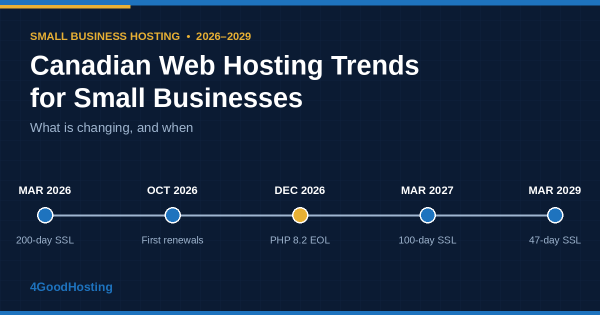
Calendar graphic of Canadian web hosting changes for small businesses from 2026 to 2029
This guide organizes the Canadian web hosting trends that matter to small businesses by date and by consequence. Each section explains what is changing, what it means for a typical business website, and what to ask your provider.
| Date | Change | Who it affects |
| 15 March 2026 (in force) | Maximum public SSL/TLS certificate lifetime cut from 398 to 200 days | Every website using HTTPS |
| October 2026 | First 200-day certificates issued in March begin expiring | Sites that renew certificates manually |
| 31 December 2026 | PHP 8.2 reaches end of life; PHP 8.4 leaves active support | WordPress and other PHP sites on older versions |
| 15 March 2027 | Maximum certificate lifetime cut to 100 days | Every website using HTTPS |
| 15 March 2029 | Maximum certificate lifetime cut to 47 days; domain validation reuse cut to 10 days | Every website using HTTPS |
| Already in force | Gmail and Yahoo (since February 2024) and Outlook.com (since May 2025) require SPF, DKIM and DMARC from bulk senders | Businesses sending 5,000+ emails a day to those providers |
The first four rows are not forecasts. They are scheduled changes, and a small business that ignores them will find out when a browser warning appears, a plugin stops updating or a newsletter vanishes into spam folders.
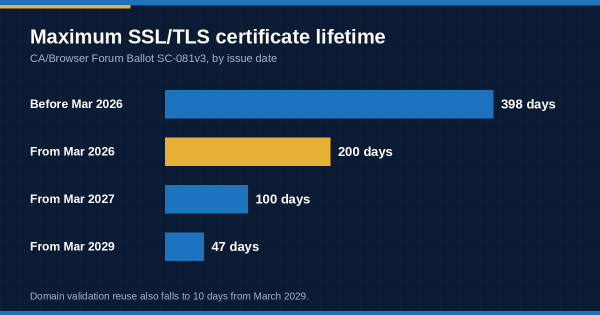
An SSL/TLS certificate is what puts the padlock in a browser’s address bar and lets a site use HTTPS. Browsers and certificate authorities set the rules for certificates through the CA/Browser Forum. In April 2025 the forum approved Ballot SC-081v3, which shortens the maximum life of a public certificate in three steps:
| Certificates issued | Maximum validity | Domain validation reuse |
| Before 15 March 2026 | 398 days | 398 days |
| 15 March 2026 to 14 March 2027 | 200 days | 200 days |
| 15 March 2027 to 14 March 2029 | 100 days | 100 days |
| From 15 March 2029 | 47 days | 10 days |
The first step is already in force. Certificates issued around mid-March 2026 run out in early October 2026, so the first wave of 200-day renewals is arriving now. By 2029 a certificate will last about seven weeks, and proof that you control the domain will have to be refreshed every ten days.
For a small business, this trend has a simple implication: certificate renewal has to be automatic. A process that relies on someone remembering an annual reminder email will fail roughly twice a year in 2026, more than three times a year from 2027, and around eight times a year from 2029.
Most small business sites never touch this directly. Many web hosting companies already issue and renew certificates automatically through the ACME protocol, the same mechanism free certificate services use. The businesses at risk are the ones that bought a paid certificate separately and installed it by hand. The same goes for anyone who points a domain at a third-party service, such as a booking tool or online store, whose certificate renewal nobody has confirmed.
What to check: list every hostname your business uses (www, shop, booking, mail) and confirm who renews each certificate and how.
Timeline showing maximum SSL certificate lifetime falling from 398 days to 200 days in 2026, 100 days in 2027 and 47 days in 2029
PHP is the programming language that runs WordPress and most other small business content management systems. Each PHP version receives two years of active support and then two years of security-only fixes, with all support windows now ending on 31 December.
Where things stand at the end of September 2026:
| PHP version | Status | Security support ends |
| 8.1 and older | End of life | Already ended (8.1 on 31 Dec 2025) |
| 8.2 | Security fixes only | 31 December 2026 |
| 8.3 | Security fixes only | 31 December 2027 |
| 8.4 | Active support until 31 Dec 2026 | 31 December 2028 |
| 8.5 | Active support | 31 December 2029 |
A site on PHP 8.2 has about three months before its language runtime stops receiving security patches from the PHP project. A site on 8.1 or older is already running unsupported code. Some operating-system vendors backport fixes to older versions for a time, so “end of life” does not always mean “unpatched” on day one. But the WordPress plugin ecosystem moves on, and plugins increasingly refuse to install or update on old PHP versions.
This is where website hosting and site maintenance meet. The hosting company controls which PHP versions are available on the server. The site owner, or their developer, controls whether the site’s theme and plugins work on the newer version. An upgrade that nobody has tested is the most common reason sites sit on old PHP for years.
What to check: find your site’s PHP version in your hosting control panel. If it is 8.2 or lower, test the site on 8.3 or 8.4 in a staging copy before December. Many hosts offer a one-click staging environment for exactly this.
For most small businesses, the domain name does two jobs: it hosts the website and it carries the business email. The email side has changed more in the last two years than the web side.
Google and Yahoo began requiring bulk senders to authenticate their mail in February 2024. Microsoft followed for Outlook.com, Hotmail.com and Live.com addresses from 5 May 2025. The rules are broadly aligned across all three providers:
The formal thresholds apply to senders of roughly 5,000 or more messages a day to each provider. That sounds large, but a retailer’s holiday campaign, a clinic’s appointment reminders or a newsletter to a modest customer list can cross it. Microsoft and the other providers also recommend authentication for all senders, and unauthenticated mail from any domain is more likely to be filtered.
There is also a fraud side. The Canadian Anti-Fraud Centre recorded CA$67.9 million in reported spear-phishing losses in 2025, and a domain without DMARC is easier to impersonate. Our [Canadian website security statistics] guide covers that data in detail.
What to check: confirm that your domain has SPF, DKIM and DMARC records, and that every service sending on your behalf is included. That covers your email host, newsletter platform, online store and booking system. Your hosting provider or registrar manages the DNS zone where these records live.
The traffic reaching a small business website is changing composition. Cloudflare, which carries a large share of global web traffic, reported in its 2025 Year in Review that Googlebot alone accounted for about 4.5% of HTML requests to sites on its network. AI crawlers from other companies together averaged slightly less than that. “User action” crawling, where an AI assistant fetches pages in real time to answer someone’s question, grew more than fifteen-fold year over year.
Cloudflare also introduced a crawl-to-refer ratio. It compares how often a platform crawls sites with how often it sends visitors back. Search engines typically crawl tens of pages per visitor they refer. Some AI training crawlers crawled many thousands of pages per referral during 2025.
For a small business on shared or entry-level hosting, this matters in three practical ways:
What to check: ask your provider whether you can see bot traffic separately from human traffic, and whether rate-limiting or bot management is available on your plan.
Statistics Canada’s Canadian Survey on Business Conditions tracked AI adoption quarterly from 2024. In the second quarter of 2026, 19.2% of businesses reported using AI to produce goods or deliver services over the previous 12 months, up from 12.2% a year earlier and 6.1% in 2024. In the third quarter, 25.2% said they planned to use AI in the next year, and 52.7% had no plans, down from 71.8% two years earlier.
The most common uses among adopters were data analytics (36.6%), text analytics (34.5%) and virtual agents or chatbots (28.2%). Chatbots are the one that lands directly on a business website.
A chatbot widget or AI-powered form is usually a third-party script. It sends visitor input, which can include names, contact details and descriptions of personal circumstances, to a service that may be hosted outside Canada. That brings hosting and privacy together. Under PIPEDA, the business remains accountable for personal information it passes to a service provider. Among businesses not planning to adopt AI in the third quarter, 10.8% cited privacy or security concerns as a reason.
One more data point matters for planning. Statistics Canada has said the third-quarter 2026 edition was the final iteration of the Canadian Survey on Business Conditions. Small businesses that used it as a quarterly benchmark for AI adoption, costs and outlook will need other sources from now on.
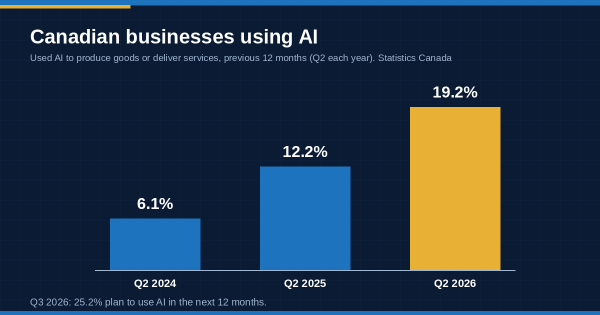
Bar chart showing Canadian business AI use rising from 6.1% in 2024 to 12.2% in 2025 and 19.2% in 2026, Statistics Canada
What to check: for any AI tool added to your site, record where it processes and stores data. Update your privacy policy to match, and confirm the tool loads without slowing pages.
Data sovereignty has shifted from a procurement preference to a government spending priority. In Budget 2025, the federal government committed $925.6 million over five years to large-scale sovereign public AI infrastructure. From 15 January to 15 February 2026 it ran a national call for proposals for sovereign AI data centres. In May 2026 it announced it was advancing work with TELUS under that initiative, with the stated aim of keeping Canadian data and intellectual property on Canadian soil.
Those projects are aimed at large-scale AI compute, not small business websites. The direction of travel is still clear, and it is reflected in buyer sentiment. CIRA’s 2025 survey found that 69% of Canadian organizations ranked data sovereignty above price when sourcing cybersecurity solutions.
The sovereignty debate has also become more precise. Commentators increasingly distinguish between data stored in Canada and data controlled under Canadian law. A server located in Canada but operated by a company subject to foreign data-access laws may satisfy the first test but not the second.
For a small business, the practical translation is modest but real. Choosing Canadian hosting keeps the website, databases and backups under Canadian jurisdiction, simplifies privacy disclosures and shortens the network path to Canadian visitors. For Québec-facing businesses it also simplifies Law 25’s requirement to assess risk before personal information leaves the province. What matters is being able to answer, for every component, where the data sits and who operates the infrastructure. A Canadian web hosting company should be able to give that answer in writing. Businesses using Canadian web hosting services from providers such as 4GoodHosting, which hosts customer sites on infrastructure in Canada, can put that answer directly into their privacy policy.
Hosting is rarely a large line item, but 2026 is a year when small businesses are reviewing every one. In Statistics Canada’s third-quarter 2026 survey, 59.8% of businesses expected cost-related obstacles over the following three months, and 41.6% named inflation. Nearly a third (32.2%) expected U.S. tariffs to hurt their business over the next year. Over a quarter (27.4%) had already passed tariff-related costs on to customers.
This produces two opposite temptations. One is to move to the cheapest available plan. The other is to keep paying for an oversized plan nobody has reviewed in years. Both are common.
A better review asks what the site actually needs:
Canada hosting plans billed in Canadian dollars remove one source of renewal surprises for businesses already dealing with tariff-driven price changes elsewhere.
Each trend above turns into one or two questions. The answers tell you more about a provider than its feature list.
| Trend | Question to ask your hosting company |
| Shorter certificates | Are certificates for every hostname on my plan issued and renewed automatically? What happens if a renewal fails? |
| PHP end of life | Which PHP versions are available now, when will older ones be retired, and is there a staging environment for testing upgrades? |
| Email authentication | Will you help set SPF, DKIM and DMARC for my domain, including for third-party senders? |
| AI crawlers | Can I see bot traffic separately, and can I rate-limit or block specific crawlers? |
| AI tools on my site | Do you host any AI features yourself, and if so where is the data processed? |
| Sovereignty | Where are my site, databases, backups and email stored, and which company operates that infrastructure? |
| Cost | What is included in my plan, what does renewal cost, and what currency is it billed in? |
Well-run web hosting companies publish most of these answers in their documentation. For the rest, a clear written reply from support is a good sign.
These steps are ordered by deadline. Most take less than an hour.
What are the main web hosting trends for small businesses in 2026?
The most consequential are scheduled changes rather than fashions. Certificate lifetimes fell to 200 days in March 2026 and fall to 100 days in March 2027. PHP 8.2 reaches end of life on 31 December 2026. Major email providers enforce SPF, DKIM and DMARC for bulk senders. AI crawlers are a growing share of website traffic, AI tools are spreading among small businesses, and data sovereignty is becoming a mainstream buying factor in Canada.
When do SSL certificates change to 47 days?
Under CA/Browser Forum Ballot SC-081v3, the maximum lifetime of a public SSL/TLS certificate falls to 47 days for certificates issued from 15 March 2029. The earlier steps are 200 days from 15 March 2026 and 100 days from 15 March 2027. By 2029, domain validation must also be refreshed every 10 days, which makes automated renewal effectively mandatory.
Is PHP 8.2 still supported?
PHP 8.2 receives security fixes only, and its support ends on 31 December 2026. PHP 8.1 and older versions are already end of life. Sites on 8.2 or older should test and move to PHP 8.3, 8.4 or 8.5, checking theme and plugin compatibility in a staging copy first.
Do small businesses need DMARC?
Google, Yahoo and Microsoft require SPF, DKIM and DMARC from senders of about 5,000 or more emails a day to their consumer mailboxes, and recommend authentication for everyone. Even below that threshold, a DMARC record makes a business domain harder to impersonate in phishing, and it improves the chance that legitimate mail reaches the inbox.
How many Canadian businesses use AI?
According to Statistics Canada, 19.2% of businesses used AI to produce goods or deliver services in the 12 months before the second quarter of 2026. That was up from 12.2% a year earlier and 6.1% in 2024. In the third quarter of 2026, 25.2% planned to use AI in the next 12 months. The most common uses were data analytics, text analytics and chatbots.
Why does Canadian hosting matter for data sovereignty?
Canadian hosting keeps a website’s files, databases and backups under Canadian jurisdiction, which simplifies privacy disclosures under PIPEDA and Québec’s Law 25. Sovereignty discussions in Canada increasingly distinguish between where data is stored and which company controls the infrastructure, so it is worth confirming both with a provider.
Should I block AI crawlers on my website?
It depends on your goals. Blocking all AI crawlers may reduce your chance of being cited in AI-generated answers, while allowing all of them can use server resources for little referral traffic. Many site owners now allow search and answer bots and limit training-only crawlers, reviewing bot traffic in their hosting statistics before deciding.
The Canadian web hosting trends that will shape small business websites over the next three years have one thing in common: most of them arrive on a schedule. Certificate lifetimes step down every March. PHP versions expire every December. Email providers have already moved from recommendation to enforcement. The less predictable trends are AI traffic, AI tools and the sovereignty push, but each still turns into a small number of concrete decisions.
A small business that works through the calendar and action plan in this guide will not need to follow hosting news closely. It will need a provider that answers the questions in this guide clearly and a short checklist reviewed once a quarter. That combination turns hosting from a background risk into something that is simply handled.
If you would like help working through the calendar in this guide, the 4GoodHosting team can check your site’s PHP version, certificate renewal and email authentication records with you. [Talk to the 4GoodHosting team →]
 September 29, 2026Canadian Hosting
 September 16, 2026VPS Hosting canada
 September 16, 2026Canadian Hosting, Hosting, Web Hosting Canada
 September 16, 2026Canadian Hosting, Web Hosting Canada, Web Hosting Toronto
 September 16, 2026VPS Hosting canada, Web Hosting Canada
 September 16, 2026Canadian Hosting, managed WordPress hosting, Toronto WordPress hosting, Web Hosting Canada, Web Hosting Toronto